Data Visualization in Marketing: A Complete Guide to Making Smarter Decisions
Discover how marketers can use data visualization to simplify analytics, track KPIs, and create impactful dashboards. This complete guide covers what is data visualization in marketing, key benefits, best practices, and more:
 By Divyesh Savaliya
Most marketing reports have the same problem: they are full of data and empty of insight. Tables that take three minutes to decode. Numbers without context. Charts that raise more questions than they answer.
Data visualization for marketers is not about making reports look nice. It is about making the right insight impossible to miss, fast enough that decisions actually follow from it.
The global data visualization market is valued at $10.92 billion in 2025 and is projected to reach $18.36 billion by 2030 at a CAGR of 10.95% (Mordor Intelligence). That growth tells you something important: organizations are no longer treating visualization as a reporting nicety. It's becoming core infrastructure.
This guide covers what marketing data visualization actually is, why it drives better decisions, the key types every marketer should know, the benefits you can point to with data, and what best-in-class execution looks like in 2026.
What Is Data Visualization in Marketing?
Marketing data visualization is the process of translating campaign metrics, customer behavior, pipeline data, and attribution signals into visual formats — charts, graphs, heatmaps, dashboards, that communicate patterns faster than raw numbers ever can.
In marketing specifically, it serves two functions that are equally important and often confused with each other:
Analysis visualization: Charts used internally to find the insight — spotting a drop in conversion rate, identifying which segment is underperforming, comparing attribution across channels.
Communication visualization: Charts used to present a finding to stakeholders — the CMO, the CFO, the sales team. These prioritize clarity and speed of comprehension over analytical depth.
Getting these two functions confused is where most marketing dashboards go wrong. Analytical charts get presented to executives who need clarity. Summary charts get used internally by analysts who need depth. The right visualization depends on who is reading it and what decision it needs to support.
This is core to what data-driven marketing means in practice. You do not just collect data. You structure it in a way that accelerates the decision that follows.
Why Marketing Data Visualization Drives Faster, Better Decisions
Human cognition is built for visuals. Research from MIT shows the human brain processes images 60,000 times faster than text. In a marketing context, that gap translates directly into decision speed.
When your attribution data lives in a spreadsheet, a stakeholder has to mentally construct the pattern. When it lives in a well-built chart, the pattern is already constructed. The stakeholder spends zero time decoding, and all their cognitive capacity goes toward deciding what to do about it.
Beyond speed, visualization surfaces patterns that table-reading misses. A sudden dip in pipeline contribution from one channel, visible in three seconds on a trend line, might take 20 minutes to spot in a spreadsheet. The best marketing teams treat dashboards the way a pilot treats instruments: not as reports to review, but as live signals to act on.
$18.36B Projected global data visualization market by 2030
Mordor Intelligence — CAGR 10.95% (2025-2030)
Cloud-based data visualization deployments now account for 63.45% of the global market (Mordor Intelligence), driven precisely by demand for always-on visibility into marketing performance. This shift from static reports to live dashboards is central to data-driven decision making in marketing.
Key Benefits of Data Visualization for Marketers
The business case for investing in marketing data visualization goes beyond convenience. Here is what it actually delivers:
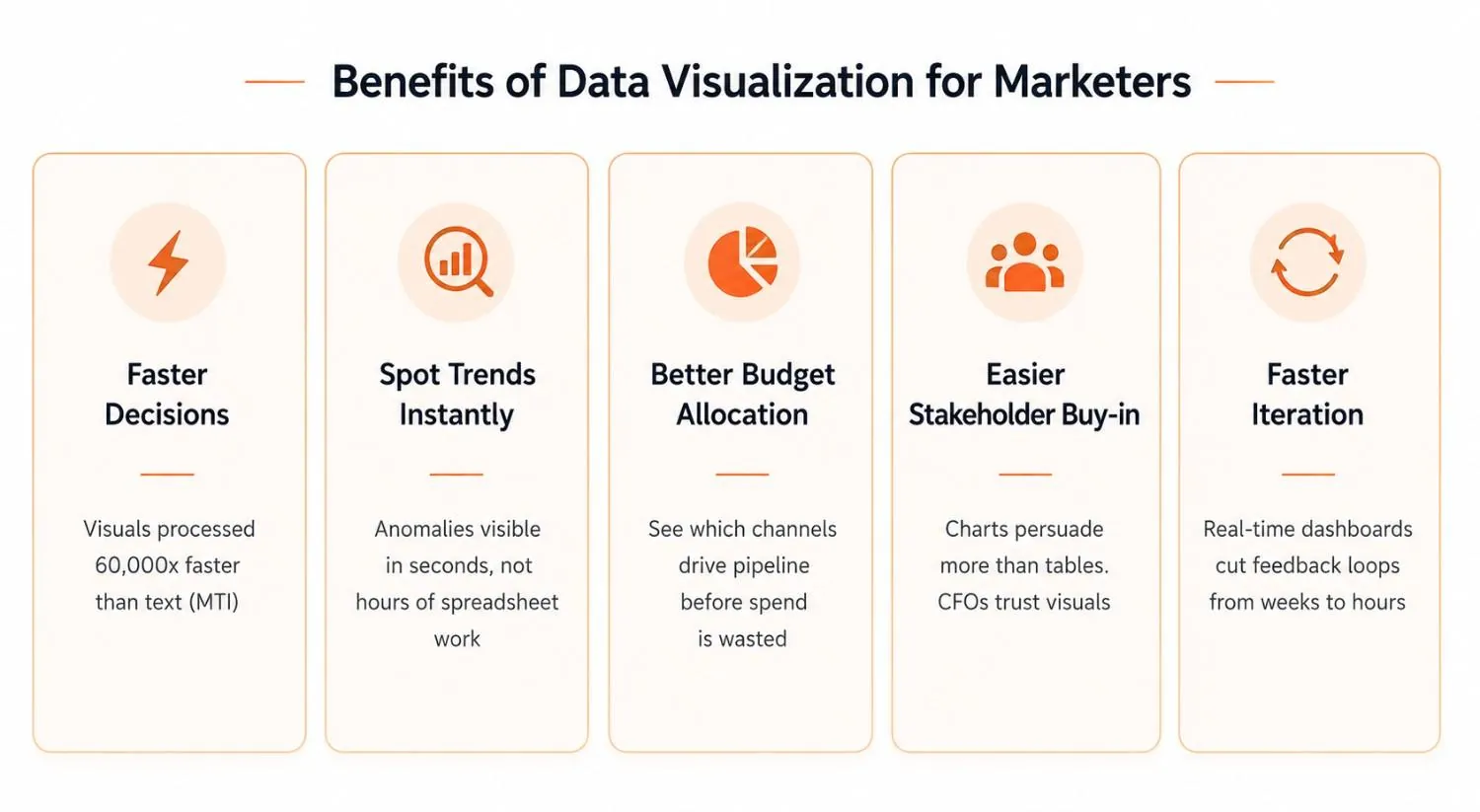
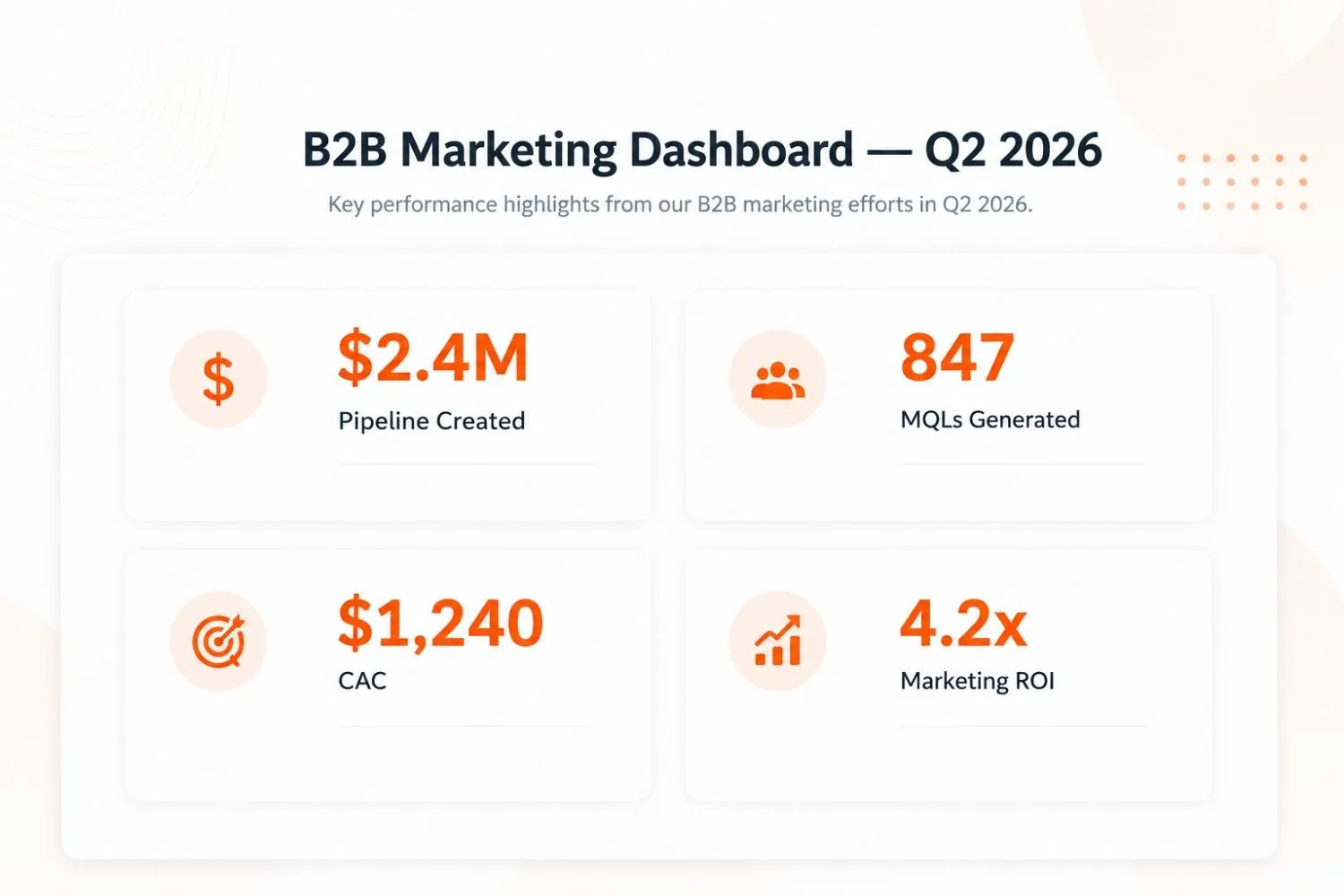
Faster decisions at every level. Visuals compress the time between data and decision. An executive reading a four-tile KPI dashboard makes a call in 30 seconds that would take five minutes of spreadsheet review. At scale, that compression changes how fast your marketing organization moves.
Instant trend and anomaly detection. A line chart makes a month-over-month dip impossible to miss. In a raw data table, the same drop might go unnoticed for two weeks. For sales funnel automation teams, catching a conversion rate drop early — before it shows up as a missed quarter — is the difference between fixing it and reporting it.
Smarter budget allocation. When you can see which channels are driving pipeline and which are generating traffic without revenue impact, budget decisions become evidence-based rather than opinion-based. Marketing teams that visualize attribution clearly stop defending spend and start directing it.
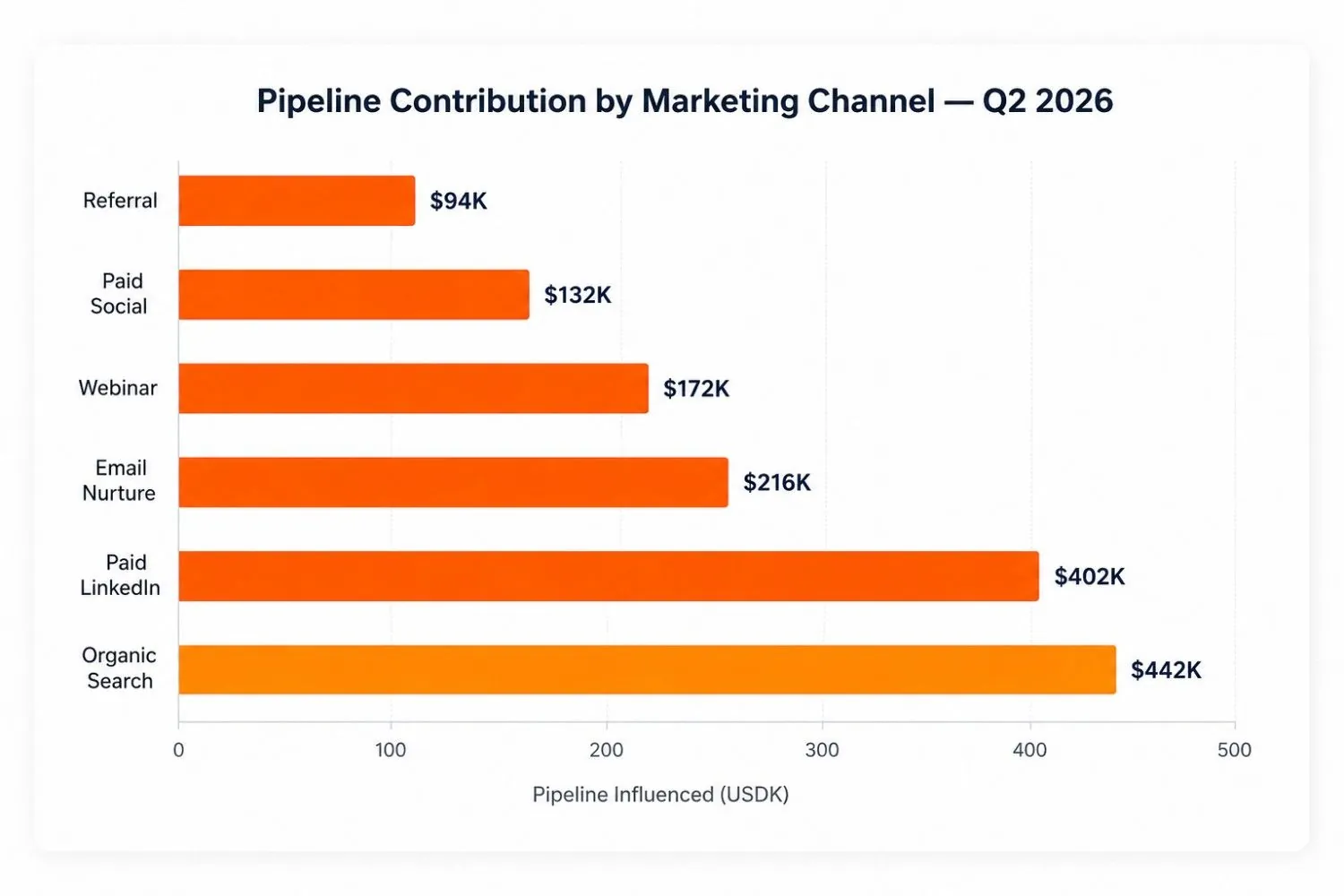
Stronger stakeholder buy-in. A chart showing pipeline contribution by channel persuades a CFO faster than a table showing the same data. Visualization reduces the cognitive work required to accept an insight. The less work your audience has to do to understand your point, the more likely they are to act on it.
Faster campaign iteration. Real-time dashboards shorten the feedback loop from weeks to hours. When you can see that a campaign variant is underperforming on Day 3, you optimize on Day 4 instead of waiting for a monthly report. This speed compounds over time into a meaningful performance advantage.
Better personalization and segmentation decisions. Visualizing performance by segment rather than in aggregate reveals where specific audiences are responding and where they are not. That visibility is what makes hyper-personalization practical at scale — you can see which experiences are working for which segments without digging through data manually.
Types of Marketing Data Visualization and When to Use Each
Choosing the wrong chart type is one of the most common visualization mistakes. The format should match the question you are asking. Here is how to match them:
Bar and Column Charts — Comparing Performance Across Channels
Best for: channel-by-channel pipeline comparison, campaign spend vs. revenue, segment conversion rates, content performance by topic cluster. Use horizontal bars when category labels are long, vertical columns for time-based comparisons.
Funnel Charts — Mapping Conversion and Pipeline Drop-Off
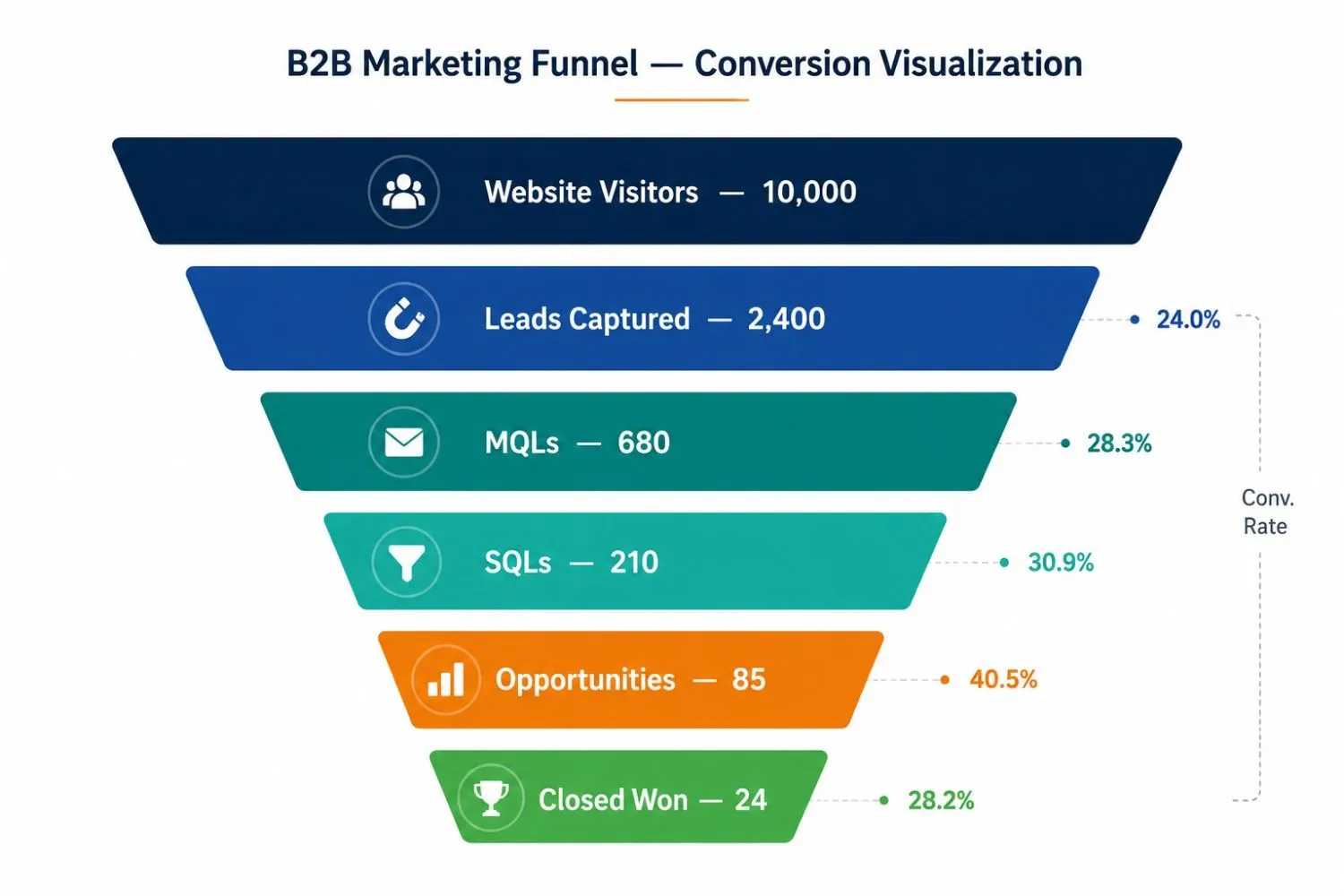
Best for: the lead-to-close journey — MQL to SQL to Opportunity to Closed Won. Makes pipeline leakage visible at a glance. If you have 680 MQLs and only 85 opportunities, the funnel chart shows exactly which stage the conversion is collapsing. This directly supports sales funnel automation analysis by surfacing where intervention is needed.
Line Charts — Showing Trends and Catching Anomalies
Best for: monthly MQL trends, organic traffic growth, email open rate across a nurture sequence, lead-to-close velocity over quarters. Adding a target line doubles the value — you immediately see not just what happened but whether it was good enough.
Heatmaps — Behavioral and Engagement Data
Best for: which sections of a landing page get clicked, which days drive highest email engagement, which content gets consumed before conversion. Heatmaps work because engagement density is spatial, and the visual system reads spatial patterns instantly.
Scatter Plots — Correlations Between Variables
Best for: ad spend vs. pipeline contribution by channel, content length vs. time on page, email frequency vs. unsubscribe rate. Scatter plots surface relationships that pivot tables hide. If you want to know whether higher content volume correlates with more pipeline or just more traffic, a scatter plot answers in seconds.
Grouped Charts — Multi-Segment Comparisons
Best for: performance across segments simultaneously — pipeline by region and quarter, MQLs by channel and persona, ROI by business unit. These matter especially when customer segmentation analysis needs to show how different audiences respond to the same campaigns. Aggregate data hides those differences. Grouped charts expose them.
Marketing Data Visualization Best Practices That Drive ROI
Good visualization discipline is not about aesthetics. Every principle here connects directly to whether an insight drives action or gets ignored.
Lead with the conclusion, not the data. Do not label a chart 'Q2 Campaign Performance.' Label it 'Paid LinkedIn generated 3x more pipeline per dollar than Google Search in Q2.' The chart proves it. The title tells the reader what to look for before they even look.
One chart, one question. If a visualization needs explanation before it can be understood, it is doing too much. Every chart should answer one specific question and be titled with that question.
Always add a benchmark or comparison. A metric without context is just a number. Pipeline this month means nothing without last month's pipeline, or the target, or the prior-year equivalent. Comparison transforms a number into an insight.
Segment before you visualize. Average metrics hide the story. Average email open rate tells you nothing. Open rate by persona, by funnel stage, or by segment tells you where to act.
Design for the decision, not the data. Before building any visualization, name the decision it will inform. Who makes it? By when? What action follows from each possible outcome? If you cannot answer those questions, the chart should not exist.
Tie your visualization to your attribution model. Campaign performance visualization is only as accurate as the attribution underneath it. If last-touch attribution is crediting re-targeting with conversions that content and email actually created, your visuals are reinforcing the wrong story. Marketing automation ROI reporting is where this shows up most clearly.
How AI Is Reshaping Marketing Data Visualization in 2026
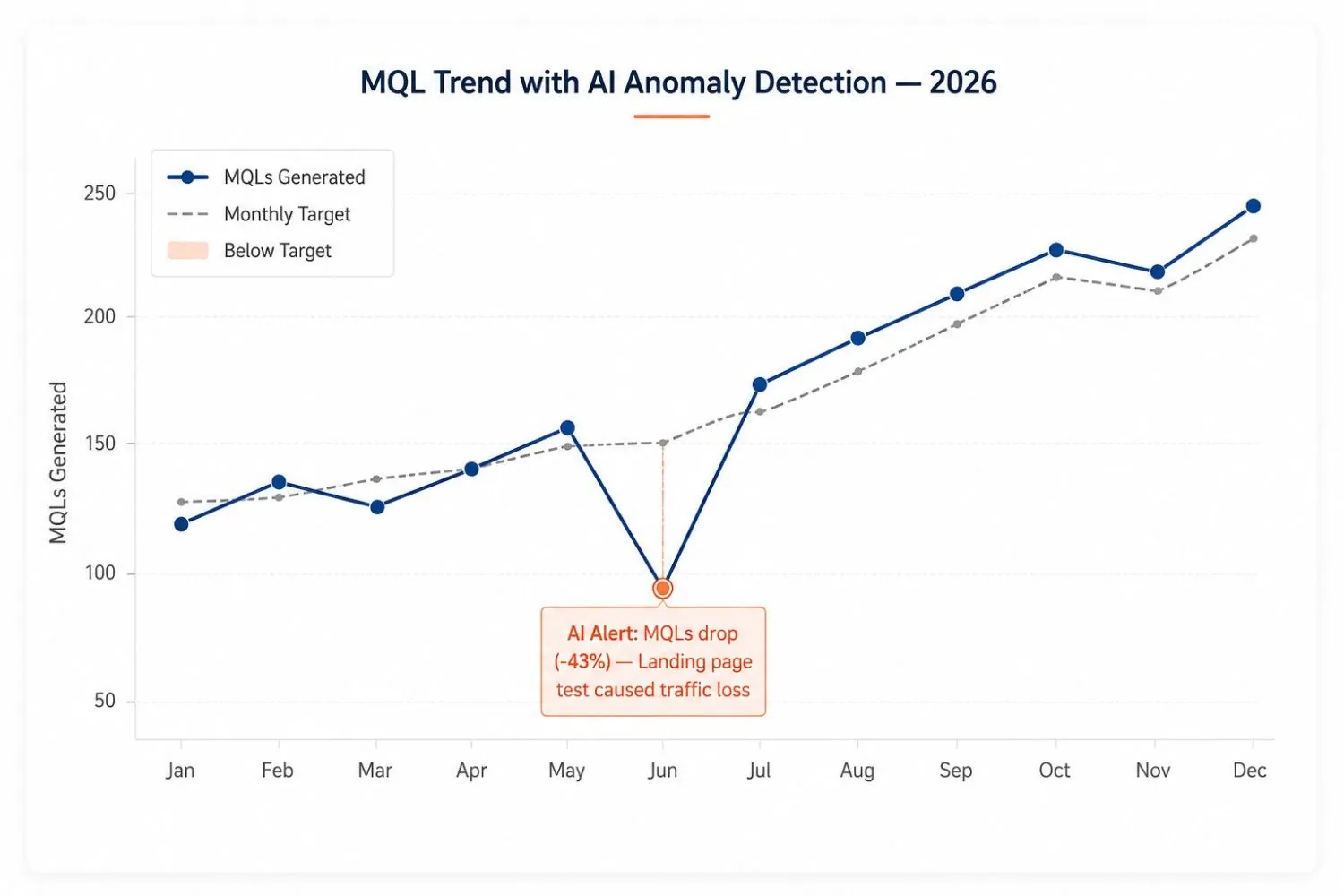
The biggest shift in data visualization for marketers in 2026 is not a new chart type. It is AI-powered anomaly detection and narrative generation — systems that surface what changed, explain why it changed, and flag which visualizations need attention before a human would have found them.
Practical implications for marketing teams:
Automated insight surfacing: AI scans dashboards continuously and flags deviations from expected ranges — a conversion rate drop, a cost-per-lead spike, a sudden behavioral shift — without waiting for a human to review a report.
Natural language querying: Tools like Tableau Pulse and Power BI Copilot now let you ask plain-language questions and receive a visualization as the answer, without writing a query.
Predictive visualization: Rather than showing wahat happened, AI-powered tools project forward — showing forecast pipeline based on current funnel velocity, or which accounts are most likely to convert based on behavioral signals.
The AI agents now operating in marketing workflows are already generating performance summaries, routing anomaly alerts to the right team members, and updating dashboards dynamically as new data flows in. The marketer's role is shifting from building reports to evaluating the insights those systems surface — and deciding what to do about them.
The Bottom Line - Transform Your Marketing Data into Smarter Business Decisions with Marketricka
Data visualization for marketers has one job: make the right insight impossible to miss at the moment a decision needs to be made. Not to make reports beautiful. Not to show how much data you have. To make the next move obvious to the person who has the authority to make it.
The market growing toward $18 billion by 2030 signals how central this capability is becoming. But the tool is secondary to the discipline. The marketers who get the most out of visualization are the ones who know what question they are answering before they open the dashboard builder, and who refuse to publish a chart that does not make the answer unmistakable.